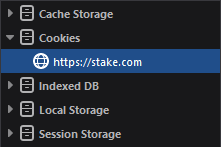
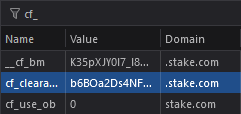
This feature should be used in case you can't pass the Cloudflare check in the app but in your browser on the same computer.
Setting the Cloudflare cf_clearance cookie is currently available for Stake.com, Stake.us and Primedice, as these sites have very strict bot-check rules enabled in Cloudflare. You can find the settings for this by navigating to the Account Selection > Select your Account > Settings.
One very important note in order for this to work, and this applies to all operating systems: The Cloudflare cf_clearance Cookie has to be from the same IP address that you're running the app on, also you have to use the same mirror in the app and browser, otherwise it won't work.
It might be helpful to clear the app cookies via Settings > General > Clear cookies (red button at the bottom) in case it's not working.
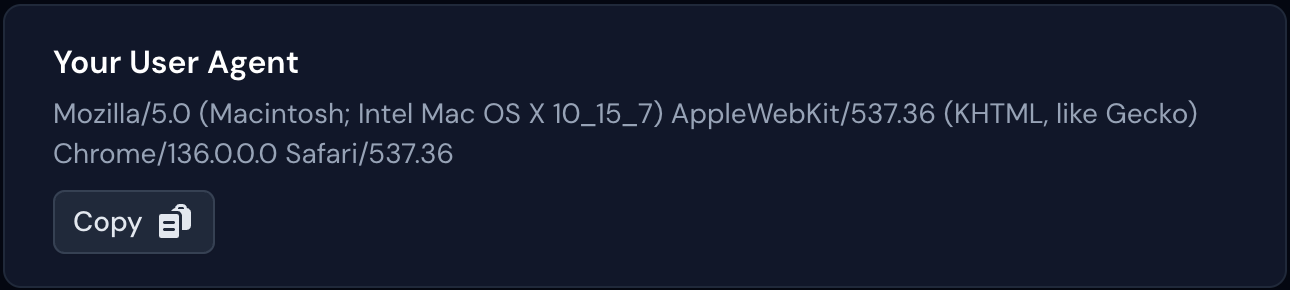
How to get the User Agent
Open https://antebot.com/user-agent/, copy the User Agent and paste it in the User Agent input field in the app.
How to extract the Cloudflare cf_clearance cookie from your browser
Google Chrome, Microsoft Edge, Brave & Opera
- Visit your desired casino mirror site in your browser (e.g. https://stake.com)
- Open the Chrome Developer Tools by pressing F12 on your Keyboard
- Click on the "Application" tab (it might be hidden in the
 menu)
menu) - On the left side of the navigation navigate to Storage > Cookies > https://stake.com (or the mirror that you're on)
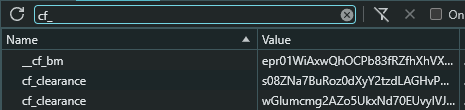
- Search for cf_ in the filter search bar
- Click on the cf_clearance cookie entry in the list. In case you have more than one cf_clearance cookie set you have to select the one with the higher expire date or simply try it out, which one works.
- After clicking on the entry in the list you can copy the entire value at the bottom of the Developer Tools and paste it in the Cloudflare Clearance Cookie Value field in the app.
- Please double check now that the mirror in the app matches the domain for the cookie in your browser!
- Press "Save values"
- Press "Connect" (API token must be filled in of course).
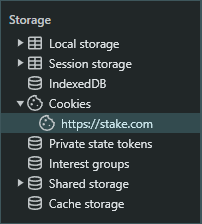
Firefox
- Visit your desired casino mirror site in your browser (e.g. https://stake.com)
- Open the Firefox Developer Tools by pressing F12 on your Keyboard
- Click on the "Storage" tab (it might be hidden in the menu)
- On the left side of the navigation navigate to Cookies > https://stake.com (or the mirror that you're on)
- Search for cf_ in the filter search bar
- Click on the cf_clearance cookie entry in the list. In case you have more than one cf_clearance cookie set you have to select the one with the higher expire date or simply try it out, which one works.
- After clicking on the entry in the list you can copy the entire value by double-clicking on the Value in the list. Copy and paste it in the Cloudflare Clearance Cookie Value field in the app.
- Please double check now that the mirror in the app matches the domain for the cookie in your browser!
- Press "Save values"
- Press "Connect" (API token must be filled in of course).